🎨 DDA3003 Introduction to D3
D3 Fundamentals
D3 (Data-Driven Documents) 是一个 JavaScript 的库,用于将数据映射到网页并制作交互/动画。
网页的标准:
- HyperText Markup Language (HTML) —— 网页的渲染语言
- Document Object Model (DOM) —— HTML 写的易操作网页结构
- Cascading Style Sheets (CSS) —— 视觉风格呈现 (颜色、字体、大小、布局…)
- Scalable Vector Graphics (SVG) —— 矢量绘图系统
- JavaScript-D3 —— 核心:存储/处理数据,实现动态化…
HTML and CSS
DOM 是 HTML 语言写的网页骨架,属于类树状结构。HTML 中 “<…> </…>“ 作为容器标签成对出现,表达了 ”以下段落是 xxx;以上 xxx 到此结束“ 的意思。 其基础结构为三个部分:declaration、head、body
<!doctype html>
<html lang="zh-CN">
  <head>
    <meta charset="utf-8" />
    <meta name="viewport" content="width=device-width, initial-scale=1" />
    <title>页面标题</title>
  </head>
  <body>
    <header>...</header>
    <main>...</main>
    <footer>...</footer>
    <script src="app.js"></script>
  </body>
</html>
<head> 的常见组份
<title>标题 —— 浏览器标签页标题<meta>元信息,诉浏览器一些不显示的页面配置信息。例如字符集:<meta charset="utf-8">;或者窗口自适应:<meta name="viewport" content="width=device-width, initial-scale=1">。
CSS
决定 body 中各个组件的视觉效果
- external css:
<link rel="stylesheet" href="styles.css" />然后在外部文件 styles.css 中编辑。 - inline css 比如:
<style>
h1 {color: blue; font-family: verdana; font-size: 300%; }
p {color: red; font-family: courier; font-size: 160%; }
</style>
<body> 的常见组份
<header>:页眉(logo、导航)<nav>:导航栏<main>:主内容(每页一般只有一个 main)<section>:内容分区(章节)<article>:独立文章/帖子<aside>:侧边栏/补充信息<footer>:页脚(版权、链接)<h1>~<h6>:不同大小的标题<p>: 文本段落<br>:换行符<div>: 一个通用容器 (division),用于分区和同一布局<script>:javascript 脚本部分(D3 就在这里) HTML 可视化项目的常见布局:
<body>
  <h1>DDA3003 项目</h1>
  <div id="controls">
    <!-- 选择框、按钮、滑条 -->
  </div>
  <div id="chart"></div>  <!-- D3 往这里塞 SVG 或 Canvas -->
  <script src="https://d3js.org/d3.v7.min.js"></script>
  <script src="main.js"></script>
</body>
Javascript Fundamentals
JS 是一门高度 OOP 性的高可读性语言,相比 C-family 更接近 Python。在 <body> 的 <script> 字段中,需要 JS (和 D3) 来组织数据。
- 声明全局变量:x = 42、恒量:const x = 42、局部变量:let x = 42 (or var x = 42)
- 分号可写可不写
- 单双引号不敏感
- 同 Python,无需声明变量类型
- print 函数:
console.log() [x, y, z]代表数组,{a: b, c: d}代表字典,完全与 Python 一致
let arr = [1, 2, 3];         // 数组
let person = { name: "A" };  // 对象
let f = function() {};       // Function(也是对象)
- 所有对象都用字典描述,比如方法:
function cat(name, sex, type) {
	this.name = name;
	this.sex = sex;
	this.type = type;
}
const myCat = new cat('Gogo', 'female', 'Ragdoll');
console.log(myCat.type);
- 数组、函数等对象都声明为 const,数组是一种特殊的 object,可以包含数组/字典作为元素,索引从 0 开始:
const cats = ['Ragdoll', 'Simease', 'BritishShortHail'];
cats[0] = 'FoldedEar';
cats.push('FoldedEar');  // 加到数组尾部
cats.pop();   // 返回最后一个元素并删除它
console.log(cats.slice(1, 3))  // 浅拷贝 1 和 2 对应的元素 ("slice[a, b)")
cats.shift();  // 删除第一个元素
cats.unshift('Ragdoll');  // 加到数组头上
const mapMeow = cats.map(x => x + ': Meow!');  // 整个数组的映射
- 对比:
forEach做事情(side effects)、map生成新数组(pure transform)
data = [42, 4, 2, 4242];
const newData = data.map(function(x) {return x + 42;});
data.forEach(x => console.log(x));
const mean = data.reduce((sum, x) => sum + x, 0) / data.length;  // 平均值
SVG Fundamentals
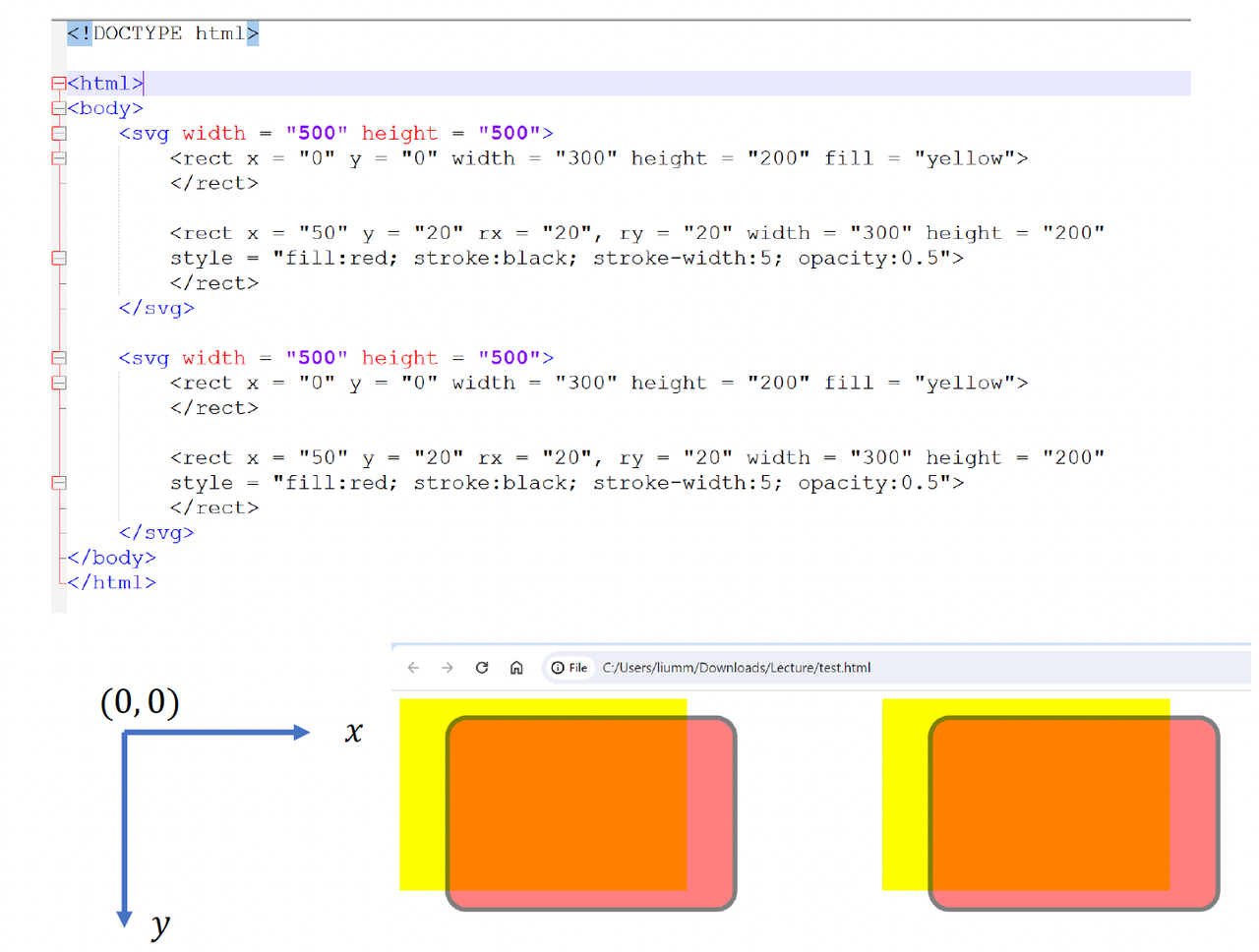
SVG 有很多基础图形的作图函数:
<svg width = "500" height = "500">
  <circle cx = "40" cy = "20" r = "30" stroke = "yellow" stroke-width = "2" fill = "white">
  </circle>
  <rect>   <!-- 类似的,x, y, width, height, ...-->
  <line>   <!-- 类似的,x1, x2, y1, y2, ...-->
  <path>
  <text>   <!-- 类似的,x, y, text-anchor, ...-->
  <g>      <!-- group,用 group = vis.append("g") 建组,group.append() 加入-->
</svg>